
Ops Playbook
What Site Requirements Are Needed for X-Ray Equipment?
May 28, 2026 · 6 min · Medical Imaging Specialists
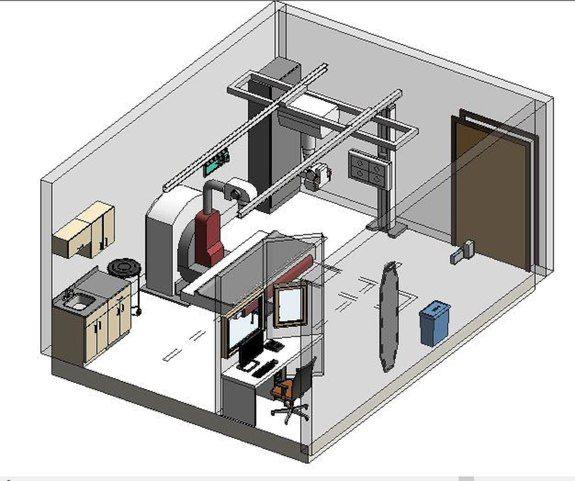
Practical considerations, risk points, and what to ask before you buy, service, move, or maintain imaging equipment.
Before installing X-ray equipment, confirm the room size, ceiling height, floor and wall layout, electrical capacity, shielding status, control area, delivery path, network/PACS needs, HVAC conditions, and local regulatory or physicist requirements. The exact site requirements depend on the system type: fixed radiography room, portable X-ray, R&F room, C-arm, DEXA, detector upgrade, or mobile workflow. Do not buy equipment from a spec sheet alone. Match the system to the room, workflow, installation path, and service plan before money changes hands.
A good X-ray project starts with the room. The wrong room assumptions can turn a clean quote into weeks of delays.
Why X-Ray Site Requirements Matter Before You Buy
X-ray equipment looks easier to site than CT or MRI, but that is exactly why projects get underestimated. Buyers focus on the system price and assume the room will be fine because another X-ray unit was there before. Sometimes that is true. Often, it is only partly true.
A replacement system may still need different power, generator placement, detector cabling, workstation location, network drops, or table and wall stand clearances. New rooms add shielding review, construction planning, IT coordination, and delivery access. Portable units avoid some construction, but still raise workflow, charging, storage, detector, network, and service questions.
The goal is simple: identify site constraints early enough to choose equipment that fits and quote the real project, not just the hardware.
If you are still comparing systems, start with the used X-ray equipment buying checklist and the guide to new, used, and refurbished X-ray equipment. Site readiness should be part of that buying decision, not an afterthought.
Start With the Type of X-Ray System
The first site-planning question is what kind of X-ray equipment the facility actually needs. “X-ray room” can mean very different things.
A general radiography room may include a table, wall stand, tube stand, generator, collimator, detector, workstation, and control console. An orthopedic room may need long-leg or stitching workflow. A chest room, urgent care setup, portable unit, C-arm, R&F system, DEXA scanner, or DR detector upgrade each changes the site conversation.
Before requesting a quote or approving a purchase, define the clinical use case, fixed-room or portable workflow, new install versus replacement, required table/wall stand/detector/workstation configuration, patient volume, PACS/RIS needs, and whether installation, deinstallation, service, and parts support are included.
This is where a vendor with service experience matters. MIS is not just matching a model number to a budget. The question is whether the system will work in the room and stay supportable after installation. For a cleaner intake, use the X-ray equipment quote checklist before asking for final pricing.
Room Dimensions, Layout, and Clearances
Room fit is the most visible site requirement and still one of the easiest to get wrong. Measure the room, ceiling height, doorway width, hallway path, control area, and any tight turns from loading dock to final location. If there is an elevator, narrow corridor, second-floor suite, or finished medical office buildout, document it early.
For a fixed X-ray room, the vendor and installer need enough information to evaluate table placement, wall stand location, tube stand travel, patient access, staff workflow, workstation position, and service access. The equipment may fit physically but still be awkward or unsafe to operate if clearances are too tight.
Send photos from all four corners of the room, the control area, generator location if known, doorways, cable paths, ceiling structure, and the delivery route. If replacing equipment, photograph the existing table, wall stand, tube stand, generator cabinet, console, detector, workstation, nameplates, and service tags.
A drawing is better than a description. A dimensioned room plan is better than a drawing. A site plan reviewed against the exact equipment configuration is best.
Electrical, Shielding, and Local Compliance Planning
X-ray equipment site planning should include electrical and shielding review, but avoid treating either as a guess. Requirements vary by equipment configuration, facility, jurisdiction, room construction, and intended use.
Electrical planning may include generator power, dedicated circuits, grounding, disconnects, cable routing, workstation power, detector charging, UPS needs, and room-control connections. Do not assume the previous system’s power is automatically correct.
Shielding and radiation-safety planning should involve the appropriate local professionals, often including a qualified physicist, architect, contractor, or state process. MIS can help identify equipment-side requirements, but final shielding, regulatory, and construction decisions belong with the facility’s professionals and local authorities.
Delivery Path, Rigging, and Deinstallation
A clean X-ray quote can still fail if nobody checked how the equipment gets into the building. Delivery access matters for fixed rooms, R&F systems, larger tables, generator cabinets, wall stands, and any project where old equipment must come out first.
Document loading dock access, parking constraints, doorway widths, hallway turns, elevator capacity, stairs, finished floors, ceiling obstructions, and after-hours access rules. Replacement projects also need a deinstallation plan; the old system may have resale, trade-in, or parts value, but removal can be complicated by anchoring, cabling, or room buildout.
If removal is part of the project, review MIS guidance on deinstalling and selling medical imaging equipment. The earlier removal is scoped, the less likely it is to collide with installation day.
Network, PACS, Workstation, and IT Requirements
Modern X-ray projects are not finished when the equipment powers on. Images need to move through the facility workflow correctly.
Before installation, identify PACS, RIS, modality worklist needs, DICOM routing expectations, network drops, IT approval process, remote-access rules, and who will be available for connectivity testing. If those terms are not familiar, get the facility’s IT or PACS contact involved before the system ships.
For used or refurbished equipment, workstation status is especially important. Confirm whether the system includes the workstation, acquisition software, detector software, export capability, required licenses, and DICOM functionality. A mechanically solid X-ray room can still be a bad purchase if the detector or workstation path is unsupported.
This is also a good time to define how service will happen after installation. Can the system be supported remotely? Who can access logs? Are parts available? Is the workstation hardware aging? MIS supports parts, service, and equipment planning, so these questions should be part of the same conversation.
Common Site Planning Mistakes
Most X-ray site problems are preventable. The common mistakes are basic: buying before confirming room fit, assuming old power fits the replacement, sending no room photos, ignoring delivery constraints, treating shielding review as a vendor checkbox, forgetting PACS/network needs, or comparing quotes with different service and installation scopes.
Before requesting a final quote, collect the facility address, room location, clinical use case, system type, room dimensions, photos, existing equipment details, electrical notes if available, shielding review status, PACS/RIS contacts, target timeline, service expectations, and removal or trade-in needs.
You do not need perfect documentation to start. You do need enough context to avoid a quote that looks good on paper and fails in the room.
FAQ
Do X-ray rooms always need shielding?
Often, but requirements depend on the room, equipment, workload, adjacent spaces, and local rules. A qualified physicist or appropriate local professional should review shielding needs.
Can I install used X-ray equipment in an existing room?
Often, yes, but only after verifying fit, power, workflow, detector/workstation requirements, serviceability, and local site requirements. Existing rooms can save time, but they can also hide old infrastructure problems.
What photos should I send before buying X-ray equipment?
Send wide room photos, control area photos, doorway and hallway photos, loading-path photos, existing equipment photos, nameplates, generator cabinet photos, workstation photos, and any drawings or service tags. More context usually means a better quote.
Do PACS and network details matter for X-ray installation?
Yes. Digital X-ray equipment must send images correctly to the facility workflow. PACS, RIS, modality worklist, DICOM routing, network drops, IT rules, and workstation support should be reviewed before installation.
Can MIS help with X-ray site planning and quote review?
Yes. MIS can review equipment options, site photos, replacement details, service needs, parts support, and installation scope so the quote matches the room and operating plan.
Schema recommendation
Use Article or BlogPosting schema for the post and FAQPage schema for the FAQ section. Service schema may also fit if the page is repurposed into an X-ray installation, site-planning, or equipment-quote service page. Avoid Offer or product-specific schema unless exact inventory, condition, pricing, and availability are approved.
Need help planning an X-ray room or replacement? Send MIS your room photos, facility location, current equipment details, clinical use case, timeline, and service expectations through the quote request page or contact MIS so the team can recommend equipment that fits the project, not just the budget.
Need help with this exact problem?
Send the modality, site location, timeline, and any system details. MIS will route the request by intent.
Related resources
Ops Playbook
What Site Requirements Are Needed for a CT Scanner?
CT scanner site requirements include room fit, power, cooling, shielding review, access, IT, service clearance, and project planning.
Ops Playbook
How Long Does CT Scanner Installation Take? Planning Guide
CT scanner installation timing depends on site readiness, rigging, power, cooling, shielding review, IT, service support, and project scope.
Buyer's Desk
What Is a Fair Price for Used X-Ray Equipment?
A fair used X-ray equipment price depends on scope, detector condition, site readiness, installation, service, parts, and support.