
Ops Playbook
What Parts Do X-Ray Machines Need to Work Properly?
May 27, 2026 · 6 min · Medical Imaging Specialists
Practical considerations, risk points, and what to ask before you buy, service, move, or maintain imaging equipment.
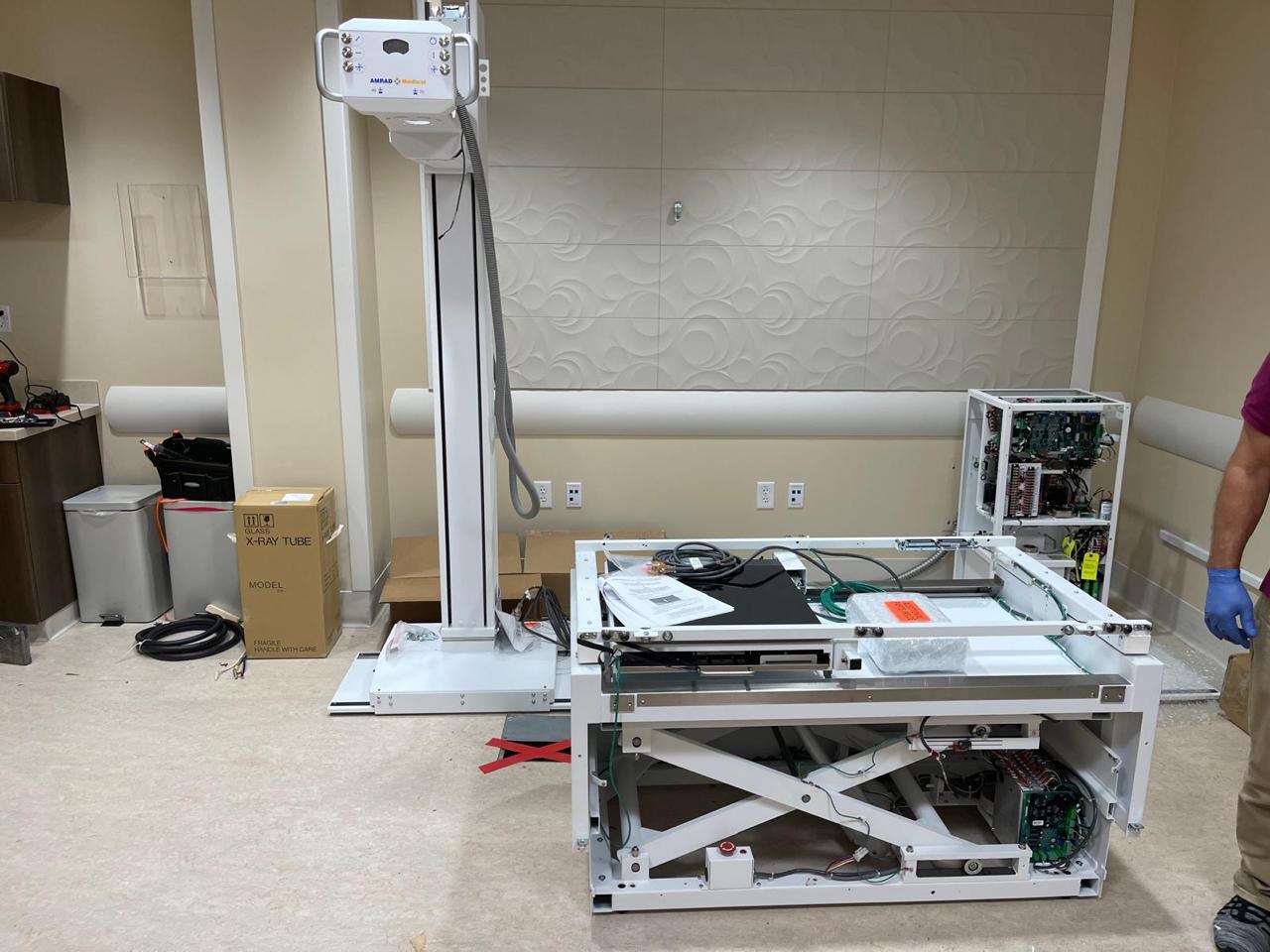
X-ray machines need the tube, generator, collimator, detector or image receptor, table or wall stand, mechanical positioning hardware, workstation, software, cables, power components, networking, and safety interlocks to function properly. In a digital X-ray room, the detector and workstation are just as important as the tube and generator because they control image capture, processing, and routing to PACS. A good parts plan looks at the whole room, not one component in isolation.
Why X-ray parts planning matters
X-ray equipment looks simpler than CT or MRI from the outside, but the room is still a connected system. The tube has to generate radiation. The generator has to deliver stable power. The collimator has to shape the beam. The table, wall stand, and tube stand have to position the patient and anatomy. The detector has to capture the exposure. The workstation has to process the image and send it where the facility needs it.
For buyers, this matters before purchase. A used or refurbished X-ray quote that excludes a detector, workstation, cables, bucky, wall stand, installation support, or connectivity can look cheaper than it really is. For operators, it matters when troubleshooting downtime. A room can be “down” because of a failed detector, generator issue, software problem, communication fault, table movement problem, or missing accessory.
MIS sees X-ray parts as part of the operating plan, not just emergency replacement items. For broader buying context, see the used X-ray equipment buying checklist and MIS parts support.
The major X-ray parts in a fixed room
Most fixed radiography rooms include a predictable group of core components. The exact configuration depends on manufacturer, room type, age, detector setup, and clinical use, but the main parts usually include:
- X-ray tube: produces the X-ray beam and is one of the most important service items in the room.
- Generator: supplies and controls the high-voltage power needed for exposures.
- Collimator: shapes and limits the X-ray beam for the selected exam.
- Tube stand or overhead tube crane: positions the tube around the patient, table, or wall stand.
- Patient table: supports positioning for exams performed lying down.
- Wall stand or vertical bucky: supports chest, spine, weight-bearing, or upright exams.
- Detector or image receptor: captures the exposure, either with DR detector technology or an older CR/film-style workflow.
- Workstation and acquisition software: controls image acquisition, processing, labeling, export, and DICOM workflow.
- Control console: allows the operator to select technique and trigger exposures from the control area.
- Cables, sensors, boards, and interface hardware: tie the room together electrically and digitally.
When comparing used X-ray equipment, ask what is included. A “complete room” should be defined line by line. If the detector, workstation, wall stand, table, generator cabinet, or cables are excluded, the project scope changes.
Tube, generator, and collimator: the exposure chain
The tube, generator, and collimator are the heart of the exposure chain. When they work correctly, the room can produce consistent exposures. When one of them is failing, image quality, repeat rate, uptime, and safety workflow can suffer.
The X-ray tube is a wear item. Tube life depends on workload, technique, cooling, age, and how the room is used. Do not assume calendar age tells the whole story.
The generator controls exposure output. Problems can show up as failed exposures, inconsistent technique, error codes, intermittent faults, or a room that will not complete an exam. Because generator work involves high-voltage systems, diagnosis and repair belong with qualified service personnel.
The collimator controls beam limitation and positioning support. Missing or malfunctioning collimator components can create service delays and may require model-specific parts.
For replacement rooms, tube and generator history should be part of the conversation. A cheap system with unclear tube status, scarce generator boards, and no service plan may not be cheap for long.
Detector, workstation, and software drive the workflow
In digital X-ray, the detector and workstation often determine whether the room feels modern or painful to use. A mechanically sound X-ray room can still be a bad fit if the detector is unreliable, slow, unsupported, or difficult to integrate.
The detector captures the image. Depending on the system, it may be fixed, wireless, tethered, shared between table and wall stand, or dedicated to one bucky. Important questions include detector size, battery condition for wireless units, calibration status, compatibility, and replacement availability.
The workstation is the operator’s daily interface. It may handle patient selection, image acquisition, processing, annotations, DICOM send, exports, and sometimes modality worklist. If it is outdated, missing licenses, locked to an unsupported software level, or not included in the sale, the room may need additional investment before it can operate as expected.
Ask whether the quote includes acquisition software, required licenses, DICOM capability, modality worklist support if needed, export options, and connectivity help. If PACS integration is important, read what to send before requesting an X-ray equipment quote.
Small parts can create big delays
The parts that delay an install are not always the expensive headline components. Missing cables, rails, grids, bucky parts, handles, covers, footswitches, sensors, hand controls, locks, brackets, interface boxes, or mounting hardware can hold up a room just as effectively as a failed generator.
This is especially true with used equipment. During deinstallation, parts can be left behind, mislabeled, damaged, or separated from the main system. A clean component photo does not prove the room package is complete.
Before shipping, request a clear included-parts list and photos of the major assemblies, labels, cables, accessories, and workstations. For replacement rooms, compare what is being removed with what is arriving.
Logistics also matter. X-ray equipment still needs the right delivery path, room access, electrical readiness, network planning, and installation support. MIS’s guide to medical imaging equipment deinstallation, shipping, and installation explains why moving equipment is part of the project.
Parts availability should shape the buying decision
A part only helps if it can be identified, sourced, installed, and supported correctly. That is why parts availability should be part of the purchase decision before the system arrives.
Before buying or repairing an X-ray room, confirm whether parts are still available, whether the exact configuration is known, whether detector/generator/tube/workstation support exists, whether qualified service is available in your region, and what is excluded from the quote or service scope.
MIS supports X-ray equipment sourcing, parts, field service, and quote planning, so the parts conversation can happen before a facility is stuck with a down room.
What to send MIS for an X-ray parts request
For a faster X-ray parts quote, send a complete, PHI-free request. Include the manufacturer, model, system serial number, part number if visible, photos of the part and label, photos of the surrounding assembly, exact error codes or symptoms, service history, facility location, urgency, and whether a qualified technician has diagnosed the failed component.
If you do not know the part number, say that. A good parts team would rather verify the component than ship a guessed part that creates another delay. For a modality-neutral checklist, see what you need for an imaging equipment parts quote.
Common mistakes include buying on price alone, assuming “working when removed” means install-ready, ignoring software status, ordering parts from blurry photos, and waiting until the room is fully down before identifying service support.
FAQ
What are the most important parts of an X-ray machine?
The most important parts are the tube, generator, collimator, detector, workstation, table or wall stand, control console, and the interface hardware that connects them. In digital rooms, the detector and workstation are critical because they affect image capture, processing, and PACS workflow.
What is usually the most expensive X-ray part to replace?
It depends on the system and configuration, but tubes, detectors, generator components, and workstation/software packages are often among the higher-cost items. The real cost also includes downtime, labor, freight, and whether the part is readily available.
Can older X-ray machines still be supported with parts?
Often, yes, but it depends on the manufacturer, model, installed base, software, and parts ecosystem. Some older systems remain serviceable because parts are available and technicians know the platform. Others become risky when detector, generator, or software support dries up.
Can MIS help identify an X-ray part without a part number?
Yes, but the request needs good documentation. Send the system make, model, serial number, photos of the component, close-up label photos, symptoms, error codes, and service context. MIS can help narrow the part, but guessing from one blurry photo is risky.
Schema recommendation
Use Article or BlogPosting schema for the post and FAQPage schema for the FAQ section. Avoid Product or Offer schema unless a specific X-ray part or system has approved live inventory, condition, price, and availability. Service schema may be appropriate for MIS parts and field-service pages, not necessarily this educational post.
Buying, repairing, or supporting an X-ray room? Send MIS the system details, room context, symptoms, photos, and timeline through the quote page or contact page, and the team can help match the parts, service, or replacement path to the actual room.
Need help with this exact problem?
Send the modality, site location, timeline, and any system details. MIS will route the request by intent.
Related resources
Ops Playbook
What Site Requirements Are Needed for a CT Scanner?
CT scanner site requirements include room fit, power, cooling, shielding review, access, IT, service clearance, and project planning.
Ops Playbook
How Long Does CT Scanner Installation Take? Planning Guide
CT scanner installation timing depends on site readiness, rigging, power, cooling, shielding review, IT, service support, and project scope.
Ops Playbook
How Quickly Can a CT Scanner Be Repaired After Downtime?
CT repair speed depends on diagnosis, parts, access, service history, and site readiness. Learn what helps a scanner get back online faster.